NavigationUser loginscreen-scraper.com welcomes...
Currently online
There are currently 0 users and 5 guests online.
|
Tutorial 3: Page 2: Embedding Session Variables
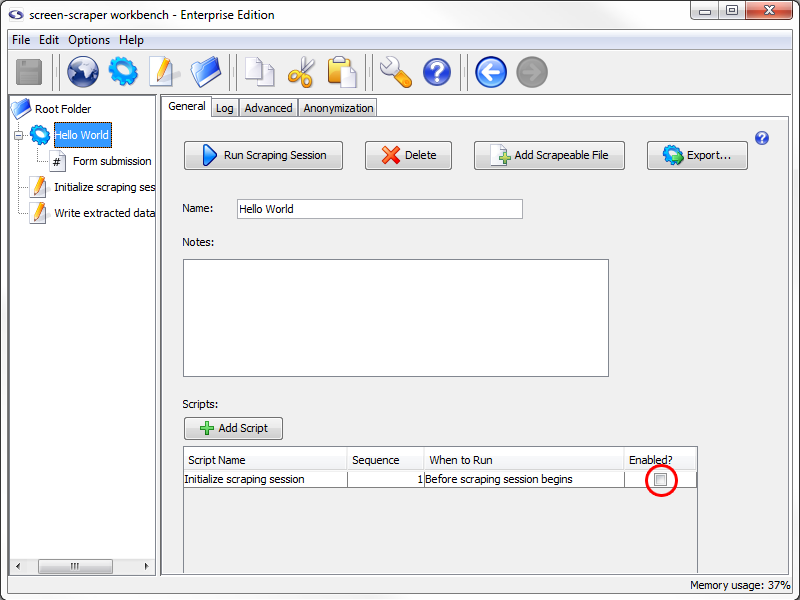
A significant limitation of our first "Hello World" project was that we could only scrape the text from our first request. That is, we were always scraping the text "Hello World!", which really isn't that useful. We'll now adjust our setup so that we can designate the text to be submitted in the form. At this point we're going to set a session variable that will hold the text we'd like submitted in the form. Within screen-scraper, session variables are used to transfer information between scripts, scrapeable files, and other objects. Session variables are generally set from within scripts, but can also be automatically set within extractor patterns as well as passed in from external applications. We'll now set up a script to set a session variable before our scraping session runs. Create a new script as you've done before, and call it "Initialize scraping session". If you prefer to script in Interpreted Java, use the following for the body of the script: // Put the text to be submitted in the form into a If you wrote the script in VBScript, make it look like this: ' Put the text to be submitted in the form into a Hopefully the scripts seem straightforward. It simply sets a session variable named "TEXT_TO_SUBMIT", and gives it the value "Hi everybody!" (spoken, of course, in your best Dr. Nick voice). Setting the session variable "TEXT_TO_SUBMIT" will allow us to access that value in other scripts and scrapeable files while our "Hello World" scraping session is running. We'll now need to associate our script with our scraping session so that it gets invoked before the scraping session begins. To do that, click on the scraping session in the tree on the left, then on the "Scripts" tab. Click the "Add Script" button to add a script. In the "Script Name" column select "Initialize scraping session". The "When to Run" column should show "Before scraping session begins", and the "Enabled" checkbox should be checked. This will cause our script to get executed at the very beginning of the scraping session so that the "TEXT_TO_SUBMIT" session variable can get set. Just as we use special tokens in extractor patterns to designate values we'd like to extract, we use special tokens to insert values of session variables into the URLs or parameters (GET, POST, or BASIC authentication) of scrapeable files. We'll do this now by embedding it into one of the parameters of our only scrapeable file. Expand the "Hello World" scraping session in the tree on the left, then select the "Form submission" scrapeable file. Click on the "Parameters" tab. In the "Value" column for our "text_string" parameter replace the text "Hello world!" with the text: ~#TEXT_TO_SUBMIT#~ The ~# and #~ delimiters are used to designate a session variable whose value should be inserted into that location when the scrapeable file gets executed. When the scrapeable file gets invoked, screen-scraper will construct the URL by including the "text_string" parameter in it. In other words, the URL for our scrapeable file will become this: http://www.screen-scraper.com/screen-scraper/tutorial/basic_form.php?text_string=Hi+everybody%21We're going to run our scraping session again, but before doing that clear out the scraping session log by selecting the "Hello World" scraping session in the tree, clicking on the "Log" tab, then on the "Clear Log" button. Start up the scraping session again by clicking the "Run Scraping Session" button. Once the scrape has run, you should notice the following lines in the log: Form submission: The following data elements were found: And if you look at the contents of the "form_submitted_text.txt" file you'll notice the same text. Remember that it's a good idea to run scraping sessions often as you make changes, and watch the log and last responses to ensure that things are working as you expect them to.
|
SearchNew Video!Tags Throughout this Site |
Recent comments
4 hours 19 min ago
4 hours 26 min ago
6 hours 32 min ago
1 day 1 hour ago
1 day 2 hours ago
1 day 3 hours ago
1 day 3 hours ago
1 day 3 hours ago
1 day 3 hours ago
3 days 10 min ago